


Most timesheet problems are not employee or tool failures: they are leadership gaps. When organizations do not clearly define how time should be recorded, reviewed, and corrected, inconsistency becomes the default. The fallout manifests in payroll corrections, billing disputes, and inaccurate project reports.
That is why setting clear timesheet rules matters. A well-defined timesheet policy turns time tracking from a vague expectation into a repeatable process. It specifies what must be logged, how time should be classified, when it needs to be submitted, and how approvals and corrections are handled.
This guide shows how to write a timesheet policy that actually works in practice. It breaks down the core rules teams need to define: so time data stays consistent, approvals happen on time, and issues are resolved before they affect pay, billing, or delivery reporting.
💡
Did you know? The U.S. Department of Labor recovered over $1 billion in back wages and damages (2021–2024)
Key insights
The following key takeaways highlight the practical risks and outcomes tied to how time is tracked, reviewed, and governed.
- Accurate time records are a legal obligation. Under the FLSA, employers must maintain reliable records of hours worked and wages paid—regardless of the tool or format used.
- Standardized time tracking improves revenue capture. QuickBooks Time reports that companies using structured tracking generate nearly 10% more billable time on average.
- Wage-and-hour failures are widespread. The U.S. Department of Labor recovered over $1 billion in back wages and damages (2021–2024), showing how often time and pay practices break down at scale.
- Approvals protect payroll and billing accuracy. Timesheet review and locking reduce late edits, rework, and errors before data reaches payroll or invoices.
- Tools don’t define rules—policies do. Automation speeds up collection, but only a clear timesheet policy defines what counts as billable time, overtime, corrections, and acceptable proof.
What is a timesheet policy?
A timesheet policy is a documented set of rules that defines how work time is recorded, submitted, reviewed, and approved. It establishes expectations for accuracy, timeliness, and accountability: and specifies how late, missing, incorrect, or post-approval changes are handled.
You may also see this referred to as a timekeeping policy. In many organizations, timekeeping focuses on payroll compliance: hours worked, overtime, breaks, and record retention. A strong employee timesheet policy covers that foundation while also supporting commercial and operational needs. It ensures:
- Pay accuracy: correct hours, compliant payroll processing, and defensible records.
- Billing accuracy: proper client coding, clear billable descriptions, and reliable project and utilization reporting.
Best Employee Timesheet App & Software – Automated Timesheet | TMetric
Boost productivity and accuracy with our time and attendance tracking software. A perfect blend of an attendance tracker and employee attendance app for your business.
How to create a timesheet policy (step-by-step)
The following steps define the rules required to make time tracking consistent, reviewable, and reliable for payroll, billing, and reporting. Each step focuses on a specific decision that removes ambiguity and ensures time entries can be reviewed and trusted once they are submitted.
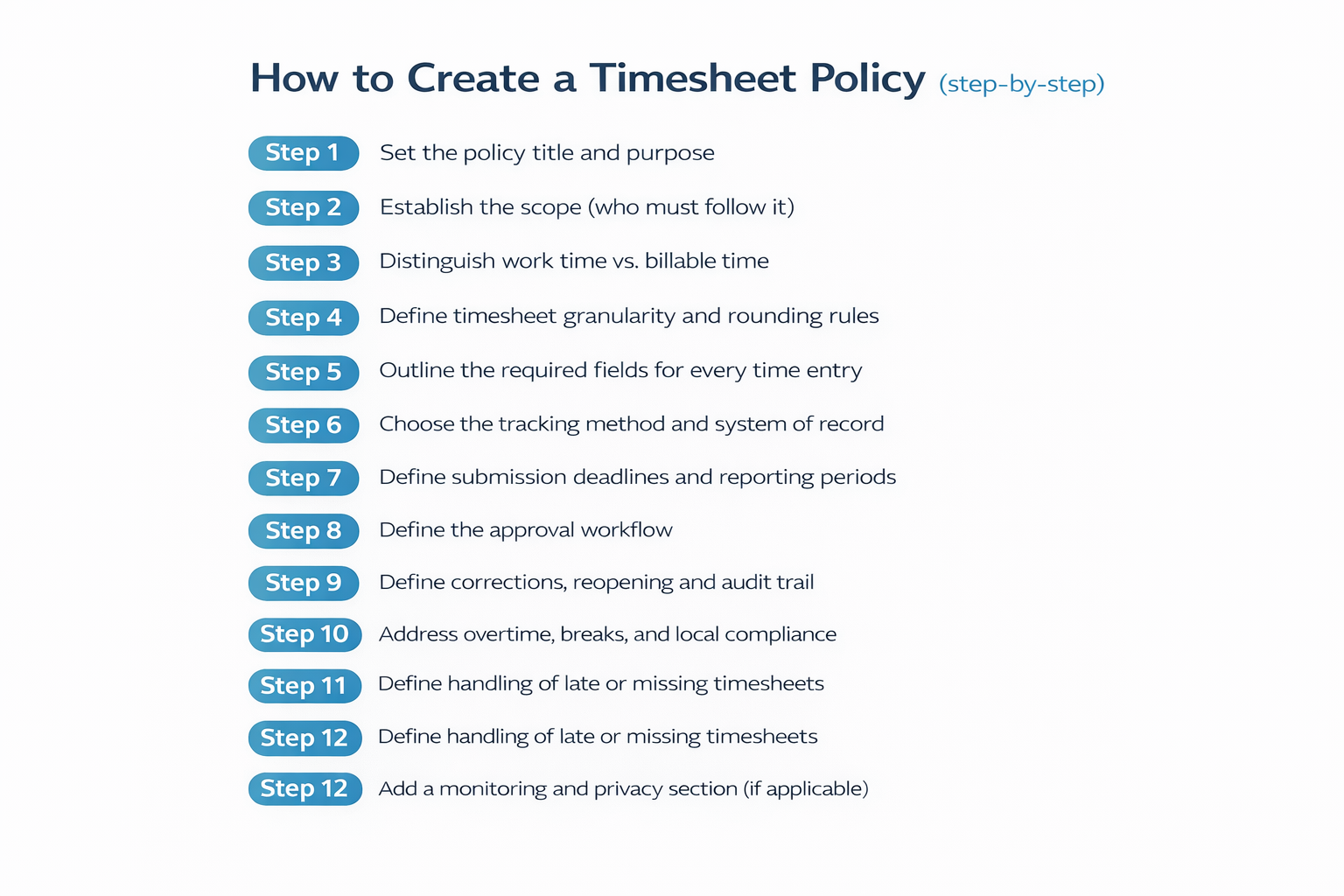
Step 1. Set the policy title and purpose
How to do it
- Use a clear, functional policy title (e.g., “Timesheet Policy” or “Timekeeping and Timesheet Policy”).
- State the policy purpose in outcome-driven terms.
- Link time tracking directly to payroll, billing, and reporting outcomes.
💡
Pro tip: Frame the purpose as mutual protection for employees and the business.
⚠️Mistake to avoid: Positioning the policy as surveillance or control.
Step 2. Establish the scope (who must follow it)
How to do it
- List all roles required to follow the policy, including employees, contractors, and interns.
- Document any exemptions explicitly and in writing.
- Specify where the policy applies (office, remote, hybrid, client site).
💡
Pro tip: Create a separate subsection for contractors who submit time for invoicing.
⚠️Mistake to avoid: Applying identical rules to internal teams and client-billable teams.
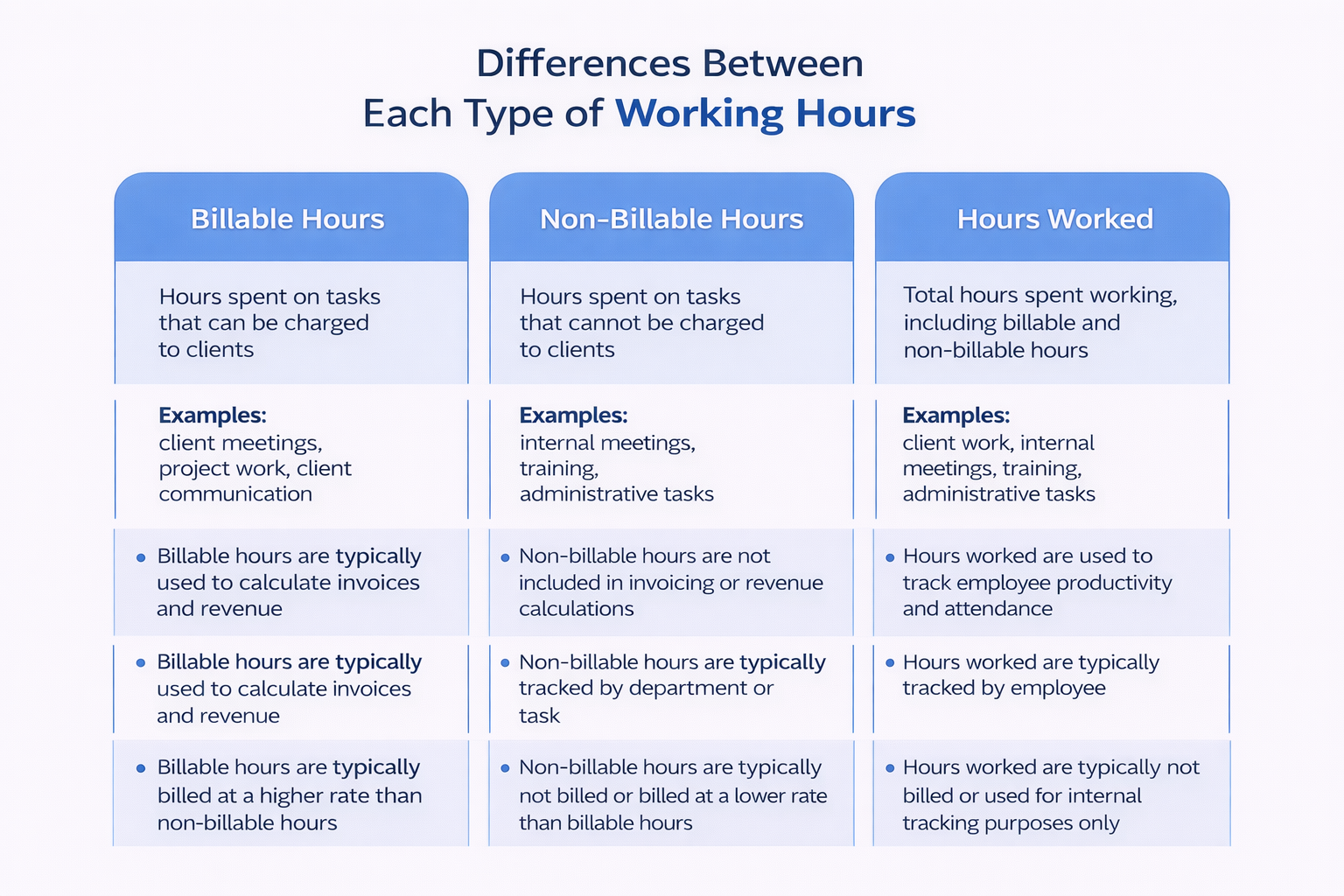
Step 3. Distinguish “work time” vs. “billable time.”
How to do it
- Clarify which activities qualify as paid work time.
- Designate billable time based on client contract terms.
- Separate non-billable time categories explicitly.
💡
Pro tip: Always prioritize pay accuracy over billing logic.
⚠️Mistake to avoid: Leaving small or fragmented work undefined.
Step 4. Define timesheet granularity and rounding rules
How to do it
- Select the smallest unit of time tracking (e.g., 1–15 minutes).
- Define whether rounding is allowed and how it is applied.
- Require entries to reflect actual work performed.
💡
Pro tip: Apply rounding during invoicing, not during time capture.
⚠️Common mistake to avoid: Rounding up entries without stating it explicitly.
Step 5. Outline the required fields for every time entry
How to do it
- Require every entry to reference a client or project.
- Classify work using standardized task categories.
- Record the actual duration of work performed.
- Describe the work performed and its outcome.
Description standards:
- Acceptable: Use outcome-focused descriptions (e.g., “Reviewed API error logs; identified timeout cause; documented fix”).
- Unacceptable: Reject vague entries such as “Work,” “Project tasks,” or “Misc.”
💡
Pro tip: Write descriptions that could be shared with a client if needed.
⚠️Mistake to avoid: Allowing generic buckets without a narrative. This weakens invoice credibility and eliminates reporting value.
Step 6.
Select the tracking method (manual, timer-based, or automated) and establish a single system of record for payroll and billing.
Reports show that there is nearly a 10% higher billable time capture on average when consistently using the mentioned tools. Businesses already in the QuickBooks ecosystem can benefit from these tools. Each tool offers different features and benefits catered to specific needs, such as weekly workflows, approval processes, and payroll controls. Among these tools, TMetric stands out for enforcing timesheet policy rules at the system level, ensuring accuracy, submission and approval gates, post-approval changes control, evidence-based verification, and maintaining a clear system of record. Users of TMetric have found it helpful in tracking time, managing teams, and product development, as well as incorporating it into their KPI calculations. ” —Michael R, CEO


